

Sanoflow Product Update — July 2025
This month brings a deeper set of changes across HMS integrations, AI workflows, localization, and UI polish. Below you’ll find what changed, why it matters, and exactly where to turn features on.
1. New HMS Integration: Clinicorp
What it is
Clinicorp is now a native integration. You can pull specialists and locations from Clinicorp and keep Sanoflow in sync for scheduling and routing.
Why it matters
-
One source of truth for providers and locations
-
Fewer manual updates in flows and calendars
-
Cleaner reporting across systems
How to set up
-
Path: Settings → Integrations → Clinicorp
-
Connect Clinicorp, then sync specialists & locations
-
Map Clinicorp entities to Sanoflow services/teams for routing
Best practices
-
Use round-robin or assign steps with Clinicorp locations to auto-route enquiries
-
Add a fallback team for off-hours or over-capacity windows
-
Keep provider display names consistent across both systems for cleaner reporting
Notes & permissions
-
Requires org admin or integration admin
-
Check audit logs for sync attempts and field mappings
2. AI Assistant & Automation Upgrades

New AI Appointment Agent (Beta)
Add the AI Appointment Agent to flows to interpret booking intent, propose slots, and hand off to a human or a booking widget when needed.
-
Path: Flows → + Flow → Action: AI Appointment Agent (Beta)
-
Common pattern: Trigger (New enquiry or Intent detected) → AI Appointment Agent → Send Template/Booking Link → Update Enquiry Field (status = “Awaiting confirmation”)
-
Tips: Keep prompts short, provide a list of available services/locations, set guardrails for hours and slot types
Optimized AI Inbox Actions
Tone Change, Translation, and Grammar Fixing run faster and more reliably.
-
Path: Inbox → AI Assistant (Tone / Translate / Grammar)
-
Use cases: multilingual teams, brand tone normalization, regulated phrasing
New Report: WhatsApp Flow Submissions
Track submissions from WhatsApp Flows: volume, completion rate, drop-off points.
-
Path: Reports → WhatsApp Flow Submissions
-
Questions it answers: which step loses users, which CTA performs best, which segment converts
Flow Submission Values in Inbox
See user-submitted values inline in the conversation thread for better context and quicker follow-up.
-
Path: Inbox → Conversation → Submission block
-
Pro tip: Add an Update Enquiry Field action after submission to keep CRM data aligned
Static Param Bindings for WhatsApp Flow Triggers
Bind fixed values (e.g., campaign_id, clinic_id) when launching WhatsApp Flows inside app workflows for cleaner attribution.
-
Path: Flows → Trigger: WhatsApp Flow → Static Params
-
Example:
source=summer_promo,clinic_id=DXB-2
3. UI & UX Improvements
Notification Sound for Incoming Messages
A clearer, attention-grabbing sound, applied instantly after selection.
-
Path: My Profile → Notifications → Incoming sound
Enquiry & Contact Details Redesign
Faster scanning with reorganized sections and consistent quick actions (assign, tag, update stage).
Inbox Chat List Scrolling
Smoother and more responsive—large teams should notice faster navigation between threads.
4. Localization & Reporting
Full Localization Coverage
Localization now applies to main menu, page headings, reports, flows, forms, payment modules, table headers.
-
Path: Settings → Organization → Language
-
Per-user override: My Profile → Language
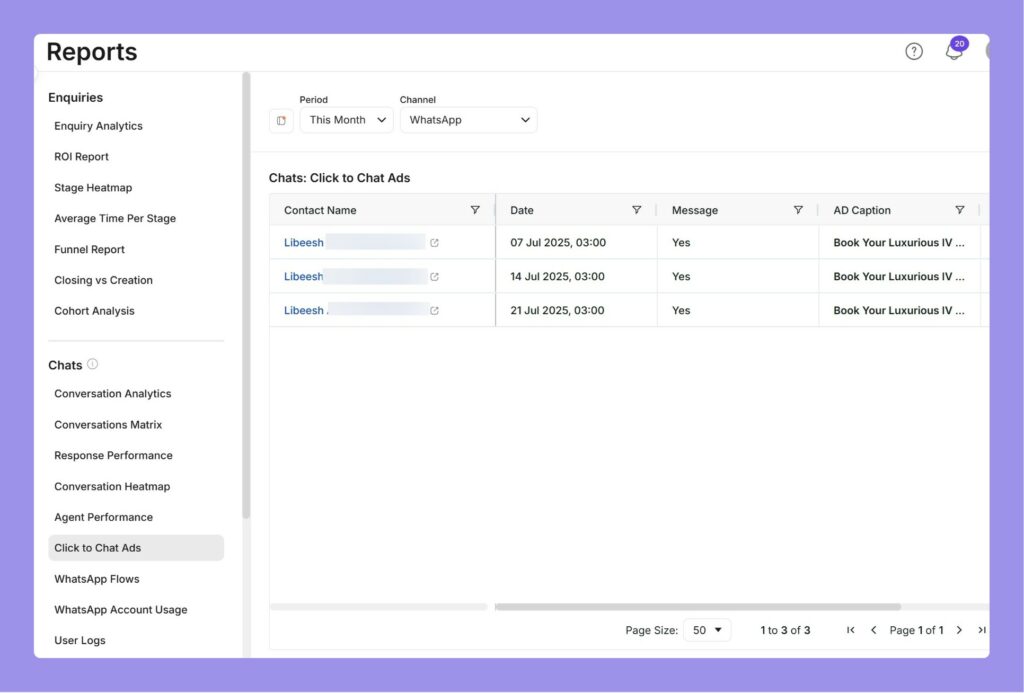
Click to Chat Ads Report (New Design)
Formerly “Ad Report,” now includes انستغرام and Messenger alongside WhatsApp.
-
Path: Reports → Click to Chat Ads
-
Use cases: channel comparison, cost-per-conversation across Meta surfaces
Knowledgebase Source Groups
Organize KB content into Source Groups for cleaner agent assist. Default group is Inbox.
-
Path: Settings → AI & Knowledgebase → Source Groups
-
Pattern: Create groups for “Policies,” “Prep Instructions,” “Pricing,” and “Clinical FAQs”
5. Other Fixes & Improvements
-
More robust handling of WhatsApp reaction webhooks (👍❤️ etc.) so flows and analytics stay accurate
-
Better reliability for “Waiting for Customer” flows—cleaner transitions and fewer stuck states
-
Various bug fixes and performance improvements across modules (inbox rendering, report refresh, flow saves)
6. Implementation Playbooks
A. Launch an AI-led Appointment Flow (Beta) in 15 minutes
-
Trigger: New enquiry → contains “book/appointment” intent
-
Action: AI Appointment Agent (Beta) with service + location hints
-
Action: Send Template with available slots or Booking Widget link
-
Action: Update Enquiry Field (stage = “Proposed”)
-
Add Fallback path to human agent if confidence < threshold
B. Attribute a WhatsApp Flow to a Campaign
-
Trigger: WhatsApp Flow with Static Params (
campaign=summer25,clinic_id=DXB-2) -
Action: Update Enquiry Field (source =
campaign) -
Report: WhatsApp Flow Submissions + Click to Chat Ads to verify lift
C. Partner Access Without Risk
-
Create user with Partner role
-
Limit to specific teams/locations
-
Share Org Metrics (modal) for performance visibility without exposing billing
Tip of the Week 💡
Use Advanced Filters to Track Payments in the Contacts Module
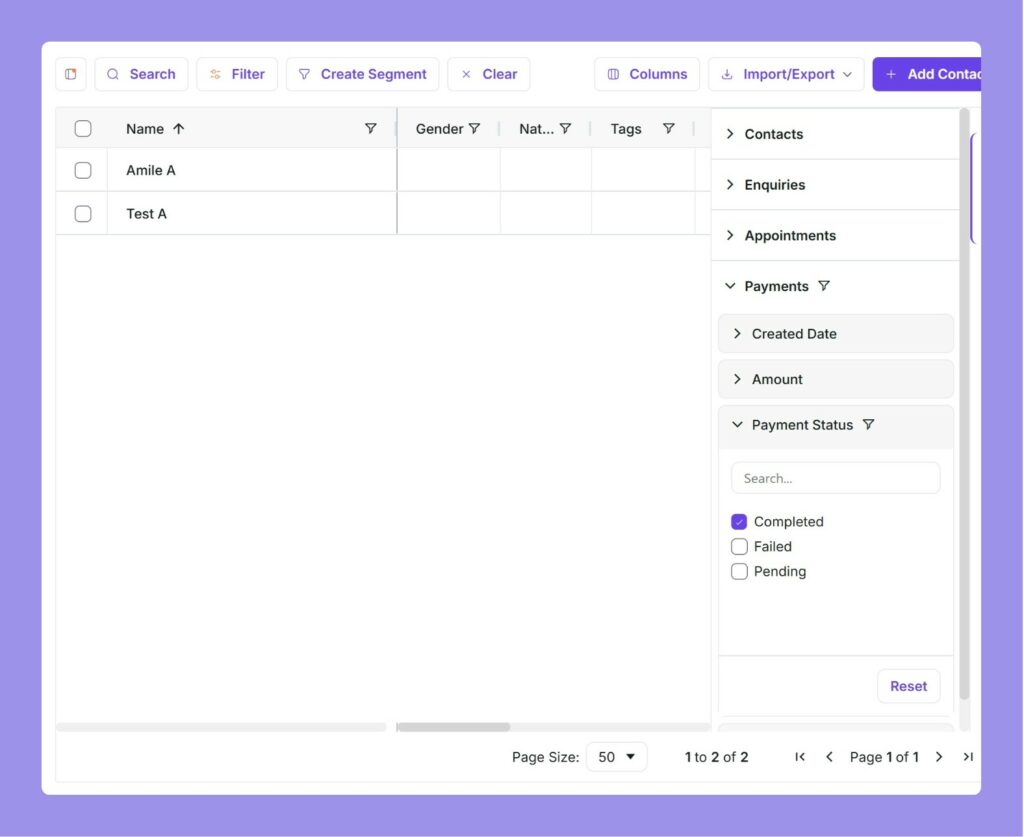
Need to quickly identify clients who have made a payment—or those who haven’t yet? With the latest update, you can now filter contacts based on payment history using Advanced Filters.
What you can do
-
Target clients with successful payments for upsells or loyalty offers.
-
Find contacts without payments and follow up with seasonal bundles (e.g., Ramadan packages).
-
Combine Payment filters with Tags, Last interaction, or Services for hyper-targeted campaigns (e.g., botox, laser, dental packages).
How to use it
-
Go to Contacts → Filters.
-
Select the new Payments filter.
-
Choose your criteria (e.g., Payment status, Amount, Date).
Pro tip
Stack filters like: Payments: none + Last interaction ≤ 30 days + Service = Consultation to build a high-intent, first-purchase segment.
FAQ & Notes
-
Who gets Clinicorp?
Any org with HMS access—contact support if you don’t see it in Integrations. -
Is the AI Appointment Agent available to everyone?
It’s Beta. Access may vary by plan and region. -
Do carousels and flows require template approval?
Yes—Meta approval applies to templates; flows must adhere to policy and session rules.