

Sanoflow Product Update — June 2025
June brings meaningful upgrades across messaging, role management, data filtering, and overall reliability. Below is the deeper dive with “why it matters,” setup steps, and practical examples you can use right away. ✨
1. Messaging & Template Enhancements
Carousel Templates Now Supported (Cloud API)
What it is
Create, edit, and send WhatsApp carousel templates through the Cloud API channel. Carousels let you showcase multiple services or offers in one swipeable message instead of a long back-and-forth thread.
Why it matters
-
Higher clickthrough: multiple choices in a single view
-
Less chat clutter: one message covers many options
-
Faster decision making: users browse and act within the same session
How to set up (admin)
-
Go to Channels → Cloud API → Templates → Create (Carousel).
-
Add cards (title, image, description, CTA). Keep titles short; front-load key terms.
-
Insert variables where needed (e.g., service name, location).
-
Submit for approval; use the approved template in Flows or Campaigns.
How to send (teams)
-
Flows: Add Send Template and select your carousel; bind variables (service, date, price).
-
Campaigns: Choose the carousel template, upload/target your audience, schedule/send.
Pro tips
-
Aim for 3–6 cards for clarity.
-
Use one primary CTA per card (e.g., “Book Now”).
-
Add a “More Options” card that links to a landing page if you have >10 items.
-
Remember Meta’s 24-hour window rules: use a template to re-open a closed window.
Keyboard Shortcut for Snippets
What it is
Type / in the inbox to pop open snippet suggestions; navigate with ↑/↓ and Enter to insert.
Why it matters
-
Faster replies and consistent tone
-
Fewer typos for regulated messages (payments, appointment rules)
Suggested snippet categories
-
Payments: “How to pay,” failed payment follow-ups, refunds
-
Appointments: prep instructions, reschedule rules, no-show policy
-
Support: troubleshooting steps, self-service links
2. Payments & Filtering Improvements
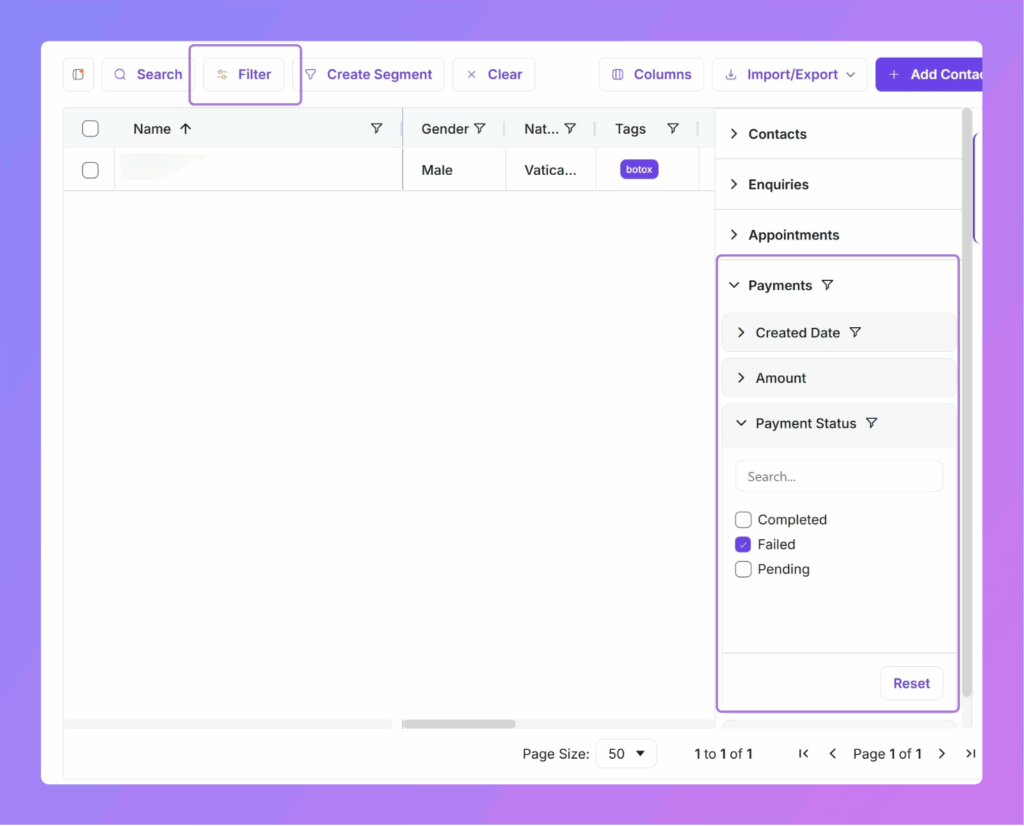
Payments Filter in Contacts (Advanced Filters)
What it is
Filter contacts by payment activity (e.g., status, amount, date).
Why it matters
-
Retarget paid customers with upsells
-
Identify non-payers for reminders or “first-purchase” offers
-
Combine with tags, last interaction, service type for precise segments
Example recipes
-
Win-back: “No payment in 60 days” + “Had a consult” → send limited-time bundle
-
VIP: “≥ 3 successful payments in last 90 days” → early access to premium slots
-
Recovery: “Payment failed last 7 days” → send a secure payment link via WhatsApp
Enquiry Update in Trigger Flows
What it is
You can now run Enquiry Update inside enquiry-triggered workflows to write back to the pipeline mid-flow.
Why it matters
-
Keep CRM state and automations in sync (e.g., “Payment Completed” → Stage: Ready for Scheduling)
-
Reduce manual work; fewer stale fields
Good patterns
-
After a “Payment Success” event → set enquiry.status = Qualified
-
After “Reschedule requested” → append to enquiry.notes + increment attempt_count
-
When no reply after X hours → set next_action = Follow-up Template and trigger template send
Implementation Playbook (copy-ready)
A. Launch a 3-card Services Carousel in 10 minutes
-
Create a Carousel template (Service A, B, C with “Book Now”).
-
Add Send Template in your Welcome flow when the contact opts for “See services”.
-
Bind {service_name} and {booking_link} per card.
-
Test with 10 contacts; review clicks per card after 24 hours.
B. Build a “First-Purchase” Segment
-
Contacts → Filters → Payments: status = none, last interaction ≤ 30 days.
-
Add Tag = Starter Offer and run a carousel showing 3 starter packages.
-
Measure reply rate vs. a plain text message.
C. Auto-qualify Enquiries After Payment
-
Trigger: Payment Success → Action: Update Enquiry Field (stage = Qualified).
-
If service = Consult, set owner = Agent team and send booking link.
-
Log: add note “Auto-qualified by payment” to keep the audit trail clear.
FAQs & Notes
-
Who gets Carousel templates?
Any workspace with the Cloud API channel. Each template requires Meta approval. -
Will role rename break my reports?
No. Only the display label changed; metrics and permissions stay aligned. -
Suspend vs. delete—what should I use?
Use Suspend to preserve history while revoking access. Use delete only if you must remove a test user with no historical impact. -
Do I need developer support for carousels?
No. You can create and use them in the UI; API usage is optional for advanced cases. -
Any limits?
Carousels have card count and media size limits; keep media optimized for quick loads. Availability of advanced features can depend on your plan and channel permissions. 🧩
Change Log (at a glance)
-
Messaging: Carousel templates (Cloud API); / snippets with arrow-key navigation
-
Roles/Users: “Patient Rep” → Agent; Suspend/Unsuspend replaces delete
-
Data: Payments filter in Contacts; Enquiry Update inside enquiry-triggered flows
-
Platform: Embedded signup supports WhatsApp Business App; multiple small fixes and performance improvements
Have questions or want help setting up carousels, segments, or enquiry updates? Open a ticket from your Sanoflow account and we’ll walk you through best-practice configurations.